×

注意!页面内容来自https://lists.handsontek.net/modify-list-column-name-microsoft-lists/,本站不储存任何内容,为了更好的阅读体验进行在线解析,若有广告出现,请及时反馈。若您觉得侵犯了您的利益,请通知我们进行删除,然后访问 原网页

How to modify a list column name in Microsoft Lists

A column name in a list is used to help users to identify what type of information is store in each cell. Throughout the live of projects in SharePoint and Microsoft Lists requirements can change or you can have made a typo when creating the lists.

If you face yourself in this situationin this article I’m showing you how to easily modify the column name and what things should you take into consideration when doing it.
Rename Microsoft Lists column

There are several different ways of renaming the columns and bellow you can find the ones I used the mostthat can be performed from the modern list interface.

Rename Microsoft Lists columns using the settings

This method is convenient for scenarios where you need to simply modify one of the columns:

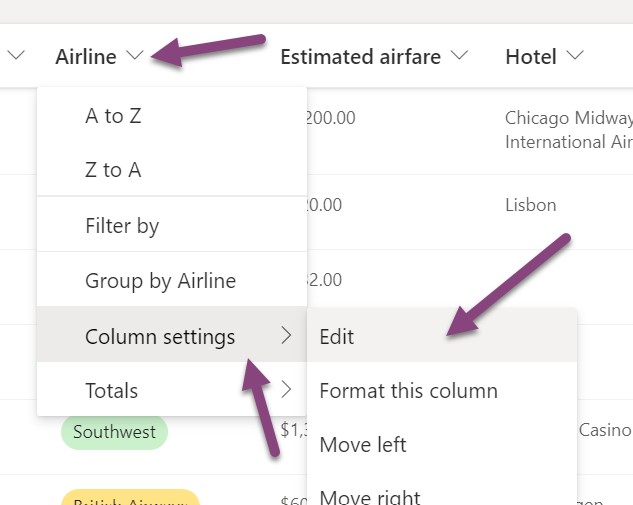
  1. From the list locate the column you want to rename
  2. Click in the arrow next to the column name
  3. Expand the column settings and then click in edit
    Rename Microsoft Lists column
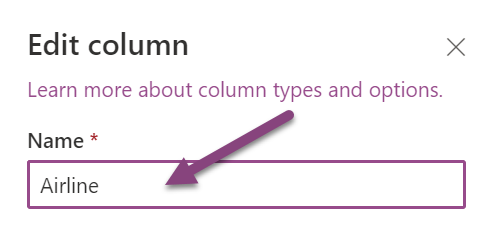
  4. From the settings pane change the name and click on save
    Rename Microsoft Lists column

Rename Microsoft Lists columns using the edit mode

If you are planning a major refactoring to the list column namesthis method will save you some time:

  1. From the list click in the Edit in grid view button
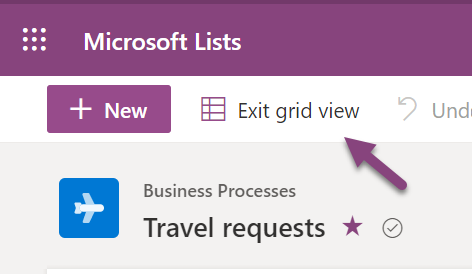
    Rename Microsoft Lists column
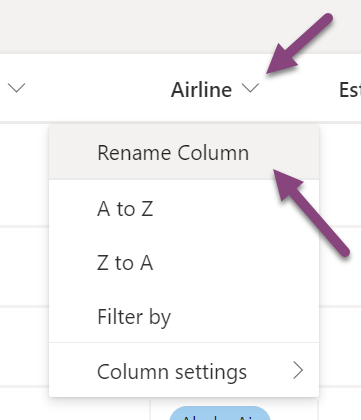
  2. With the list in edit modeclick in the name of the column
  3. From the menu click on Rename column
    Rename Microsoft Lists column
  4. The column name will become a text boxand it is ready to be renamed

Both methods described in this article only rename the visual name of the columneach column in the list also has an internal name that never changes. Thankfully you don’t need to worry too much about itunless you are a developer and need to reference the column by the internal name.


No comments yet

Leave a Reply


I've been working with Microsoft Technologies over the last ten yearsmainly focused on creating collaboration and productivity solutions that drive the adoption of Microsoft Modern Workplace.

<> .card { padding-top: 20px; margin: 10px 0 20px 0; background-color: #ccc; border-top-width: 0; border-bottom-width: 2px; -webkit-box-shadow: none; -moz-box-shadow: none; box-shadow: none; -webkit-box-sizing: border-box; -moz-box-sizing: border-box; box-sizing: border-box; } .card .card-heading { padding: 0 20px; margin: 0; } .card .card-heading.simple { font-size: 20px; font-weight: 300; color: #777; border-bottom: 1px solid #e5e5e5; } .card .card-heading.image img { display: inline-block; width: 46px; height: 46px; margin-right: 15px; vertical-align: top; border: 0; -webkit-border-radius: 50%; -moz-border-radius: 50%; border-radius: 50%; } .card .card-heading.image .card-heading-header { display: inline-block; vertical-align: top; } .card .card-heading.image .card-heading-header h3 { margin: 0; font-size: 14px; line-height: 16px; color: #262626; } .card .card-heading.image .card-heading-header span { font-size: 12px; color: #999999; } .card .card-body { padding: 0 20px; margin-top: 20px; } .card .card-media { padding: 0 20px; margin: 0 -14px; } .card .card-media img { max-width: 100%; max-height: 100%; } .card .card-actions { min-height: 30px; padding: 0 20px 20px 20px; margin: 20px 0 0 0; } .card .card-comments { padding: 20px; margin: 0; background-color: #f8f8f8; } .card .card-comments .comments-collapse-toggle { padding: 0; margin: 0 20px 12px 20px; } .card .card-comments .comments-collapse-toggle a, .card .card-comments .comments-collapse-toggle span { padding-right: 5px; overflow: hidden; font-size: 12px; color: #999; text-overflow: ellipsis; white-space: nowrap; } .card-comments .media-heading { font-size: 13px; font-weight: bold; } .card.people { position: relative; display: inline-block; width: 170px; height: 300px; padding-top: 0; margin-left: 20px; overflow: hidden; vertical-align: top; } .card.people:first-child { margin-left: 0; } .card.people .card-top { position: absolute; top: 0; left: 0; display: inline-block; width: 170px; height: 150px; background-color: #ffffff; } .card.people .card-top.green { background-color: #53a93f; } .card.people .card-top.blue { background-color: #427fed; } .card.people .card-info { position: absolute; top: 150px; display: inline-block; width: 100%; height: 101px; overflow: hidden; background: #ffffff; -webkit-box-sizing: border-box; -moz-box-sizing: border-box; box-sizing: border-box; } .card.people .card-info .title { display: block; margin: 8px 14px 0 14px; overflow: hidden; font-size: 16px; font-weight: bold; line-height: 18px; color: #404040; } .card.people .card-info .desc { display: block; margin: 8px 14px 0 14px; overflow: hidden; font-size: 12px; line-height: 16px; color: #737373; text-overflow: ellipsis; } .card.people .card-bottom { position: absolute; bottom: 0; left: 0; display: inline-block; width: 100%; padding: 10px 20px; line-height: 29px; text-align: center; -webkit-box-sizing: border-box; -moz-box-sizing: border-box; box-sizing: border-box; } .card.hovercard { position: relative; padding-top: 0; overflow: hidden; text-align: center; background-color: #ccc; } .card.hovercard .cardheader { background-size: cover; height: 135px; } .card.hovercard .avatar { position: relative; top: -70px; margin-bottom: -50px; } .card.hovercard .avatar img { width: 150px; height: 150px; max-width: 150px; max-height: 150px; -webkit-border-radius: 50%; -moz-border-radius: 50%; border-radius: 50%; border: 5px solid rgba(255,255,255,0.5); } .card.hovercard .info { padding: 4px 8px 10px; } .card.hovercard .info .title { margin-bottom: 4px; font-size: 24px; line-height: 1; color: #262626; vertical-align: middle; } .card.hovercard .info .desc { overflow: hidden; font-size: 12px; line-height: 20px; color: #737373; text-overflow: ellipsis; } .card.hovercard .bottom { padding: 0 20px; margin-bottom: 17px; } .btn{ border-radius: 50%; width:32px; height:32px; line-height:18px; } .card.hovercard .cardheader{ background: url('https://handsontek.net/images/Generic/banner.jpg'); background-size: cover; }

Trending Posts