

Google Play Store is the official marketplace for Android apps and games. It lets you discover and install softwaremanage app updatesreview subscriptions and purchasesjoin beta programsand access security tools such as Google Play Protect.
Google Play handles app updatessecurity checksand compatibility behind the scenesmaking sure software installs smoothly and stays up to date. Operated by Googlethe Play Store is an essential system component rather than just a storefront – one that most users rely on daily without ever having to think about it.
How do I install the Google Play Store APK on my Android device?
To install the APKusers need to enable "Install from unknown sources" or use the phone's file manager or browser to initiate installation after downloading. On newer Android versionspermissions may need to be granted per app (like Chrome or Files). It's also important to install the correct version based on your Android version and CPU architecture.
What's the difference between the Google Play Store vs Google Play Services?
Google Play Store is the app marketplace and update manager that users interact with directly. Google Play services is a separate background system component used by Android apps for functions such as Google account authenticationnotificationslocation servicesdevice securityand synchronization. Updating or installing the Play Store does not replace Google Play services.
What is a Google Play Store APK and why would someone want to install it manually?
A Google Play Store APK is the installation file for Google's official Android app marketplace. Users may install it manually when the Play Store is outdateddamagedmissingor unable to update normally. This is common on devices that come without Google servicessuch as some tablets or phones from Chinaor after a custom ROM installation.
Why doesn't the Google Play Store work even after installing the APK?
Installing the Play Store APK may not be enough because it depends on components such as Google Play servicesGoogle Services Frameworkand Google account services. If these components are missing or incompatiblethe Play Store may crash or fail to open. Users often need to install a compatible bundle of Google appsknown as a GApps packageto get full functionality.
Can I downgrade the Google Play Store by installing an older APK?
Yesmany users do this to avoid bugs introduced in newer versions. Howeverthe Play Store will usually auto-update to the latest version unless updates are disabled. Downgrading may require uninstalling updates via system settings firstand success may vary based on Android version and device restrictions.
Features

Download apps and games
Browse Android apps and games by categorysearch for specific titlesview screenshots and ratingsand check compatibility before installing.
Manage app updates
Update individual apps manuallyinstall all pending updates at onceor configure automatic updates based on your network preferences.
Review security information
Google Play Protect scans apps for potentially harmful behavior and can warn you aboutdisableor remove unsafe software. App listings may also include permissionscontent ratingsand Data safety information supplied by developers.
Manage purchases and subscriptions
Review installed appssubscriptionspayment methodspurchase historyPlay balanceand family-related settings from your Google account.
Discover new and upcoming apps
Pre-register for upcoming releasesjoin supported beta programsfollow personalized recommendationsand find apps that are compatible with your devices.
Access books and audiobooks
Google Play also provides access to eBooks and audiobooks through Google Play Books. Movies and television purchases are now handled primarily through Google TV rather than the Play Store's older Movies & TV interface.
What's New
- [Phone] This update collapses subtasks in Organized by AI section in search results.
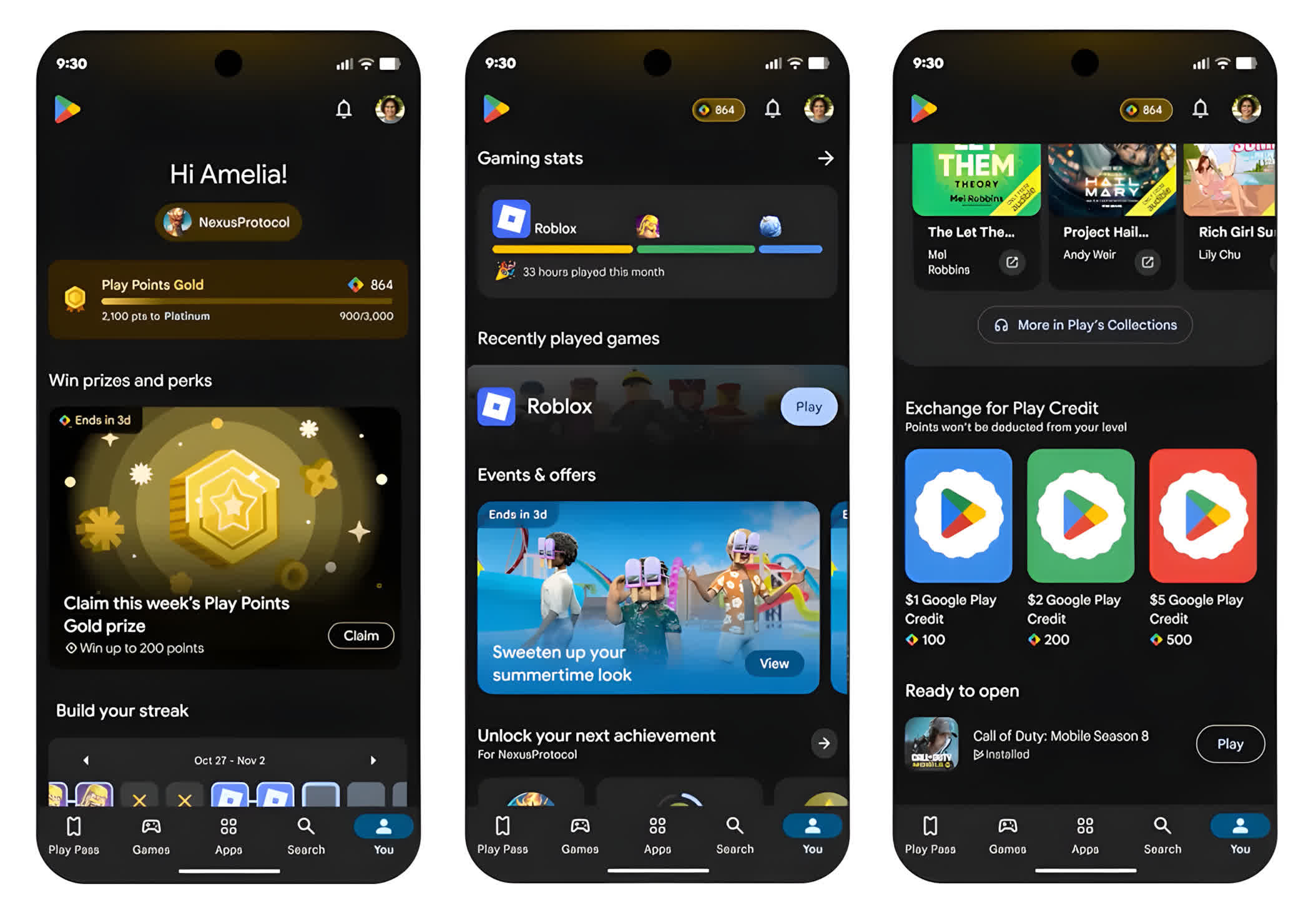
- [Phone] Adds support for real-time updates of unlocked game achievements in the Play Store.
- [Phone] Allow users to select from multiple prizes instead of receiving a single one.
- [Phone] For users in the European Economic Area (EEA) and the UKyou can now find more information on app detail pages to help identify regulated medical device apps.
- Improvements to security and privacy and updates for bug fixes.
- New developer features for Google & 3rd party app developers to support functionality related to displaying web content in their apps.
- [Phone] With this updateyou'll get improved notifications about your recent app installs that are ready to use.
- [Phone] UI improvements to help prevent disablement of protection due to exploitation.
- [PCPhone] With this updateeditorial pages on Play feature new formats that highlight apps and content more effectively.
- [Phone] With this new updatea new section in Comics Hub shows all the latest manga release in one place.
- [Phone] At the top of the Apps tabwe've added a new featured format.
- [Phone] Users in South Korea will now find a dedicated entertainment section under Apps.
- [Phone] You can now restore your favorite apps faster on your new Android phone.
- [Phone] With the new task-based search featureyou can find apps that can help you finish your tasks.
- [Phone] Snippets now show more relevant results.
Important: Some features may be experimental and available to certain users.
