Forum Widgets
Latest Discussions

Missing keyboard section in the device manager.
I no longer have a keyboard section in the device manager.DavidGG42Aug 022026Copper Contributor9Views0likes1Comment
How (if possible) do I remove thi
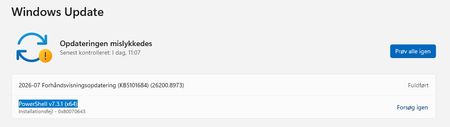
Hi. Windows Update wants to install PowerShell v7.3.1 (x64) on my desktop computereven though I already have newer versionPowerShell 7.6.3.0-x64installed! I have tried a lot of those 'tips' found with a Google searchbut 10+ restarts laterI still have the view seen on WU.jpg! Is there any way I can remove that annoying message? Have a nice day :-) WU.jpg WU2.jpgGettysburgExpressAug 022026Copper Contributor33Views0likes1Comment
can not start phone link
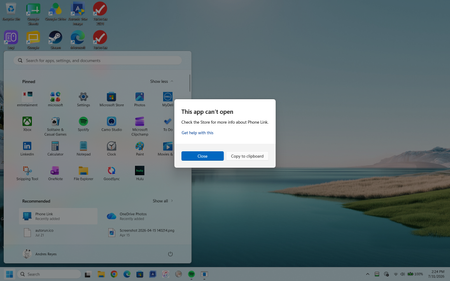
I was not able to start phone link. I followed the instructions to uninstall it and then install it from the store. I restarted the computer after each step. I went into settings and enabled phone link and set the option to allow to tun on the background and restarted again. when I click on prone link on the application list I get the following What do I need to do?andyreyAug 022026Copper Contributor25Views0likes1Comment
Saving Downloads folder to OneDrive
Is it possible to save a Downloads folder to OneDrive? I have two computers. One is old and contains most of my important files. My new computer (Lenovo Yoga 2-in-1)has had ongoing issues. I haven't been able to use it much. Howeverit contains some important information in the Downloads folder. The new computer has to be sent away to resolve the problems. Is it possible to transfer this Downloads folder to OneDrive?EML56Aug 022026Copper Contributor50Views0likes1Comment
Windows 11 Home - fresh install - bitlocker problem
Hello i just did a fresh install of windows 11 home on my desktop. And after rebooting my second ssd ( partition d ) is asking for a bitlocker key. I can't connect to https://aka.ms/recoverykey the site dosen't work for me. Is there a way to recover my data or it is lost forever?RCristianAug 012026Copper Contributor42Views0likes1Comment
DISM Restore Health Error & Missing Repair Content
Helllo I ran DISM RestoreHealth and received the error below. Where do I find the "Missing Repair Content"? Assistance is much appreciated! C:\Windows\System32>DISM /Online /Cleanup-Image /RestoreHealth Deployment Image Servicing and Management tool Version: 10.0.26100.8972 Image Version: 10.0.26200.8973 Error: 0x800f0915 The repair content could not be found anywhere. Check the internet connectivity or use the "Source" option to specify the location of the files that are required to restore the image. Device name HP-Pavilion-Aero-13 Processor AMD Ryzen 5 5600U with Radeon Graphics (2.30 GHz) Installed RAM 8,00 GB (7,34 GB usable) Graphics card AMD Radeon(TM) Graphics (496 MB) Storage 377 GB of 477 GB used Device ID C7917A82-ED46-4B01-ABE3-EC4F88384CD3 Product ID 00342-43205-35004-AAOEM System type 64-bit operating systemx64-based processor Pen and touch No pen or touch input is available for this display Edition Windows 11 Home Single Language Version 25H2 Installed on 08 Oct 2024 OS build 26200.8894 Experience Windows Feature Experience Pack 1000.26100.334.0JamesNelAug 012026Copper Contributor53Views0likes1CommentBest way to add text to a video automatically on Windows 11?
Hello Stuck here for two days and still not finding a good solution. I want add text to video automatically on a Windows 11 PC. The goal is to create subtitles and text overlays without manually typing every lineespecially for longer videos. There are many video editors and AI caption tools availablebut it's hard to know which ones provide accurate speech recognition and good-looking text placement. A simple tool that can generate captionsedit the textand export the final video would be ideal. Pls recommend an easy tool that lets me add text to video on Windows 11? Any recommendations for accurate AI subtitle generation and beginner-friendly editing would be greatly appreciated. Thanks!ChosenwassAug 012026Tin Contributor60Views0likes11Comments
Windows 11 PC System File Error Messages
I keep getting random system file error messages on my Windows 11 PCsuch as "Windows cannot find the specified file" or "The system file is corrupted," even when opening basic applications like File Explorer or Notepad. I have already run the System File Checker with sfc /scannow and the DISM restore health commandbut both tools report no issuesyet the errors continue to appear. Could someone advise on what else might be causing these messages and how to trace the root problem without reinstalling Windows?GaitpzokAug 012026Tin Contributor47Views0likes2CommentsBitLocker issue I'm experiencing
Hello I would really appreciate your assistance with a BitLocker issue I'm experiencing. My ASUS VivoBook (Windows 11) motherboard failedso I removed the internal SSD and connected it to another computer. The drive is asking for the BitLocker recovery key. UnfortunatelyI cannot locate the recovery key in my Microsoft accounteven though I have checked all the Microsoft accounts I have used. The BitLocker recovery key ID is 28E471BC and this ID does not appear in any of my accounts. Please help.TkhohliweAug 012026Copper Contributor37Views0likes1Comment


Tags
- Features2,507 Topics
- configuration2,079 Topics
- device management1,575 Topics
- Update management1,139 Topics
- security1,106 Topics
- Application Management1,007 Topics
- deployment682 Topics
- community588 Topics
- accessibility369 Topics
- licensing332 Topics