×

注意!页面内容来自https://teslamotorsclub.com/tmc/threads/nvme-drive-setup-walkthrough.250162/,本站不储存任何内容,为了更好的阅读体验进行在线解析,若有广告出现,请及时反馈。若您觉得侵犯了您的利益,请通知我们进行删除,然后访问 原网页

<> .p-pageWrapper .p-navSticky { top: 0 !important; } .uix_mainTabBar {top: 60px !important;} .uix_stickyBodyElement:not(.offCanvasMenu) { top: 75px !important; min-height: calc(100vh - 75px) !important; } .uix_sidebarInner .uix_sidebar--scroller {margin-top: 75px;} .uix_sidebarInner {margin-top: -75px;} .p-body-sideNavInner .uix_sidebar--scroller {margin-top: 75px;} .p-body-sideNavInner {margin-top: -75px;} .uix_stickyCategoryStrips {top: 75px !important;} #XF .u-anchorTarget { height: 75px; margin-top: -75px; } @media (max-width: 650px) { .p-sectionLinks {display: none;} .uix_mainTabBar {top: 60px !important;} .uix_stickyBodyElement:not(.offCanvasMenu) { top: 75px !important; min-height: calc(100vh - 75px) !important; } .uix_sidebarInner .uix_sidebar--scroller {margin-top: 75px;} .uix_sidebarInner {margin-top: -75px;} .p-body-sideNavInner .uix_sidebar--scroller {margin-top: 75px;} .p-body-sideNavInner {margin-top: -75px;} .uix_stickyCategoryStrips {top: 75px !important;} #XF .u-anchorTarget { height: 75px; margin-top: -75px; } } .uix_sidebarNav .uix_sidebar--scroller {max-height: calc(100vh - 75px);}
Welcome to Tesla Motors Club
Discuss Tesla's Model SModel 3Model XModel YCybertruckRoadster and More.
Register
You are using an out of date browser. It may not display this or other websites correctly.
You should upgrade or use an alternative browser.

NVME Drive setup walkthrough

This site may earn commission on affiliate links.

thesmokingman

Active Member
Jun 212021
4,496
13,073
Socal
When we first got the Y back in June '21 I was too frugal to spend money on a SSD drive. Being in IT I've got a handful of NVME drives spare from upgrading laptops and other machines. I ordered an external NVME enclosure that is USB-C capable off Amazon for $16 back then. This enclosure is convenient because it not only works but is tool-less so its easy to swap between different length NVME drives. AlsoI originally used a rando 256gb NVME drive from a laptop but for this thread I used a 1TB Sabrent Rocket NVME. The Tesla system is quite happy with a 1TB drive. I should test the 2TB drive sometime but that's for another day.

We've had the car for six months and using the NVME that whole time. The drive has not faltered in that time and so far nothing unusualknock on wood. If you get a different enclosuretry to get one with a heatsink enclosure as under sustained music playback the drive can get warm to the touch. NVME drives have temp control systems in place so if the controller or IC get too hot internallythe drive will throttle itself so there's no worry of fault in that aspect. In my use it can get warm to the touch but not what I would call hot or worrisome.


Drives in question. I normally use the 256gb tiny 30mm 2230 NVME drive but for this thread I used the full size 1TB drive.

drive0.jpg

If you're unsure of it working if you have a different enclosureassemble it and insert it into the glovebox. The MCU should give you the option to format and if it doesthat means it works. Below is the 1TB Sabrent formatted by the Tesla system.

drive1.png

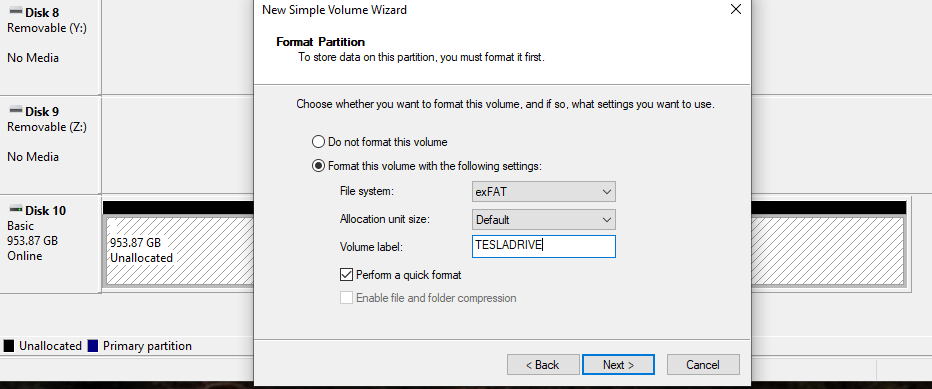
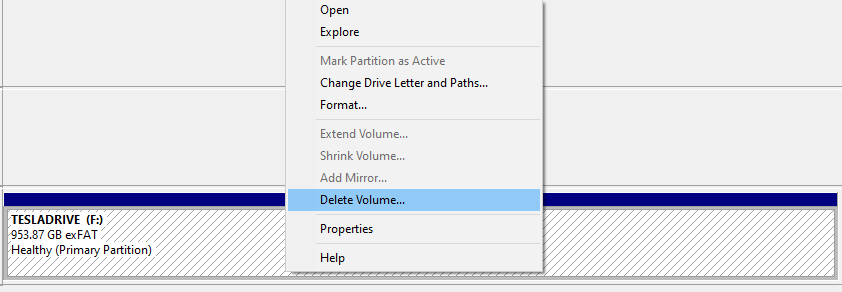
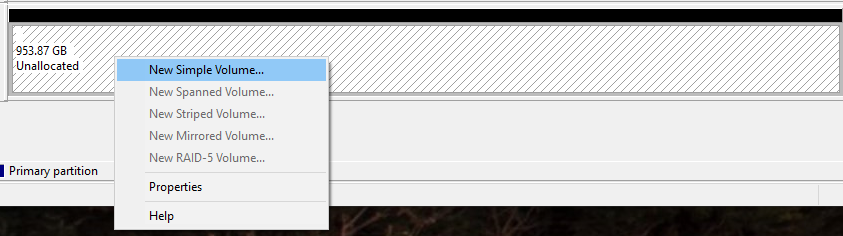
Next step is to delete that partition and partition it as two exFAT drives named TESLADRIVE (for sentry) and TESLAMUSIC (for music). When the drive is formatted in the car it will auto name the drive and create the sentry folder. However we are going to split the drive in two for sentry and music purposes.
drive2.png


drive3.png


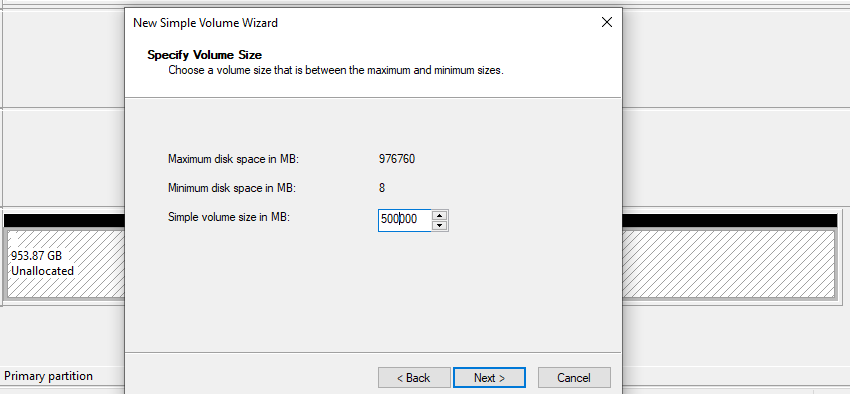
I split this 1TB drive roughly in halfit doesn't matter however you want to split it.
drive4.png


drive5.png


Once that is donego back and make the second partition for TESLAMUSICyou music drive.
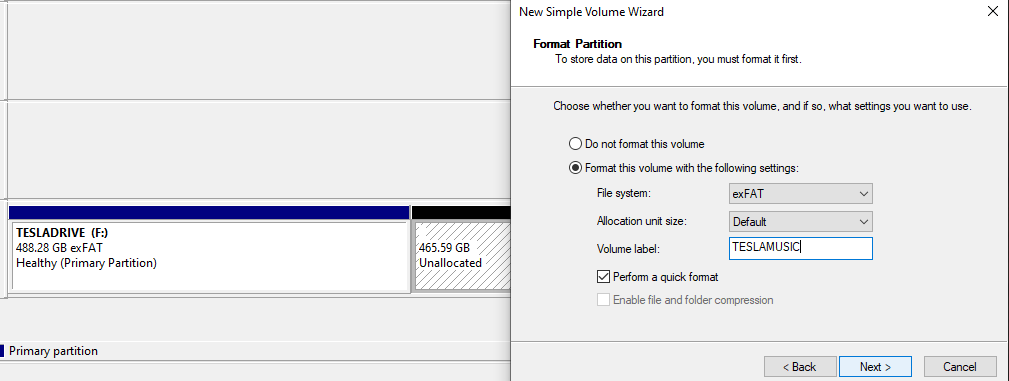
drive7.png


Once formatting is done you will need to create a folder named "TeslaCam" inside the TESLADRIVE for sentry to work. There are subfolders as well but those will be auto created when sentry runs so you don't have to create them.

drive8.png


And for the crucial music drivewith ample space you can throw on your FLAC files at the highest bitrate if you want24-192 no problem.

At the 256gb drive sizeI find I have to empty the "SentryClips" folder every two-three months or so which is before the drive fills. This is of course dependent upon how often you driveand with sentry onetc etc.

I think covered it all. Let me know if I missed something or you have an issue.
 

Attachments

  • drive9.png
    drive9.png
    13.2 KB · Views: 261
  • drive6.png
    drive6.png
    1.2 KB · Views: 403
Awesome write up. I actually went this route and picked up SK GOLD P31 nvme m.2 due to low power consumption and excellent low heat performance. The USB-C enclosure I picked up has a huge passive sink and active cooling fan and during testing I couldn't push it past 60C in ambient temps.

Quick question: how are you mounting the enclosure in the glove box? Velcrodouble sided tapezipties? I would hate the thing to dangle on the usb cable.
 
  • Like
Reactions: thesmokingman
Awesome write up. I actually went this route and picked up SK GOLD P31 nvme m.2 due to low power consumption and excellent low heat performance. The USB-C enclosure I picked up has a huge passive sink and active cooling fan and during testing I couldn't push it past 60C in ambient temps.

Quick question: how are you mounting the enclosure in the glove box? Velcrodouble sided tapezipties? I would hate the thing to dangle on the usb cable.
Thanks.

I use one of those plastic glovebox organizers which has a compartment right at the usb port. The nvme fits in that lil space under slight compression by the usb plug itself so it stays put. I think I took a pic of it lemme check.

nvme glove.jpg
 
Last edited:
I've got a 2015 Model S. After the latest software update (2021.24.28) my external M.2 drive is no longer recognized. The enclosure is a Sabrent USB-C model EC-SNVE and the M.2 drive is a Samsung 950 Pro 512GB. The drive still works with my PC and the filesystem doesn't show any errors. I tried a 256GB Samsung USB stick and found that still works with the car. Has anyone else seen issues after a software update?
 
I've got a 2015 Model S. After the latest software update (2021.24.28) my external M.2 drive is no longer recognized. The enclosure is a Sabrent USB-C model EC-SNVE and the M.2 drive is a Samsung 950 Pro 512GB. The drive still works with my PC and the filesystem doesn't show any errors. I tried a 256GB Samsung USB stick and found that still works with the car. Has anyone else seen issues after a software update?
I got a 2021 M3 currently on 2022.4.5. Originally I had a T7 512gb it worked flawlessly with no issues with the car reading the drive. I had an extra 980 1tb so I decided to use it with the Sabrent EC-SNVEthats when I started getting issues. The drive would not recognize after 3-4 days and car would need to be rebooted for it to get recognized again. I switched enclosure to the same one that thesmokingman is usingno issues so far.
 
  • Like
Reactions: thesmokingman
I've started to notice that the drive stops working when the car goes to sleep since the latest OTA updates. Upon waking the drive enclosure is missing. Opening the glovebox and re-inserting the calbe to the usb port or drive itself wakes the drive and it operates like normal. Howeverthat obviously gets annoying real fast. I have a few of these enclosure types so I swapped to a spare and it has been running w/o the sleep issue. At this point it's just a guess but the latest OTA seems to bring an incompatibility with the Inatek enclosure in the OP. The generic enclosure I've been using since figuring this out is linked below. As with these OTA updatesall we can do is adjust to the changes I suppose.


Btwon the matter of the file structure if you want to remove the pesky system volume folders follow the link below. Run the string command in an admin command prompt. My OCD hates seeing the recycle bin and system volume folders. Btw the recycle bin you can just delete right before unplugging the drive.

How to Remove the System Volume Information Folder from a Pen Drive
 
Last edited:
  • Like
Reactions: Jdmoto
Well it looks like a widespread firmware issue with the latest 2022.12.3.2. Don't throw your enclosures out just yet as it's happening to usb drivesssd as well. I'm sure they'll fix it next OTAthrow in a line to remount usb upon waking...
 
  • Like
Reactions: Jdmoto
Well it looks like a widespread firmware issue with the latest 2022.12.3.2. Don't throw your enclosures out just yet as it's happening to usb drivesssd as well. I'm sure they'll fix it next OTAthrow in a line to remount usb upon waking...

Not sure how I missed this threador didnt notice you were also in IT in any other threadsbut nice write up here.

FWIWI have a 256gb samsung endurance pro SD cardin a USB adapterplugged into my USB drive in my center console on my 2018 model 3 and I have also seen the drive disappear a few times since updating to that specific firmware update you mention. I have a legacy USB hub from Jeda in my console.

Since I dont have music on mine at all (I am a home theater audiophile but dont care that much about music fidelity unless its in a movie)I have just been hitting the "format usb" button in the car when I notice its disconnected. Had to do it 4-5 times since that particular firmware updateand pretty much never before that except as an easy way to delete the drive without taking it out.

TL; DRin this case it definitely seems like "something" firmware relatedor at the least something that is making multiple different adapters / hub type devices go a bit strange.
 
Well it looks like a widespread firmware issue with the latest 2022.12.3.2. Don't throw your enclosures out just yet as it's happening to usb drivesssd as well. I'm sure they'll fix it next OTAthrow in a line to remount usb upon waking...

I also noticed this situation during car wake up (seeing the x on the dashcam icon)this might be due to Ryzen but the USB wake up and recovers rather fast within 30 sec to 1 min. So before I pull out of the garage its up and running without any issue.

Is the issue the dashcam does not recover at all?

I'm on 2022.12.3.2 FW
 
I also noticed this situation during car wake up (seeing the x on the dashcam icon)this might be due to Ryzen but the USB wake up and recovers rather fast within 30 sec to 1 min. So before I pull out of the garage its up and running without any issue.

Is the issue the dashcam does not recover at all?

I'm on 2022.12.3.2 FW
It's happening to a lot of cars regardless of the MCU whether its AMD or Intel. I unplug and replug mine and its fine for a couple daysthen it disappears againso foir now we've gotta rinse and repeat till they fix this bug.
 
Fix incoming....


e3f3b2fd-23a5-488f-9127-ede4b237dfb8-jpeg.809823
 
  • Like
Reactions: drfickle
I bought the Samsung T7but I find it very slow at reading and writing speeds (from pc to ssd). BTW does Tesladrive and teslamusic is still the way it works?