

Ask MacRumors
iOS 27 - What to Expect in 2026
Contents
Apple won't unveil iOS 27 until the Worldwide Developers Conference in June 2026but details about the next-generation operating system have already started leaking out.
Last yearwe got a major design changeand this yearwe're going to get updates for the iPhone Folda new version of Siri with a dedicated Siri appand under-the-hood optimizations that could make iOS run faster and use less battery life.
This SeptemberApple is launching its first foldable iPhoneso iOS 27 needs some updates to accommodate it. The iPhone Fold will support two apps side-by-sidebringing multitasking to the iPhone for the first timeplus apps will get side bars. When the iPhone Fold is openit'll have an iPad-like display size with a version of iOS 27 optimized for bigger screens. When it's closedit'll look like a standard iPhone with the regular version of iOS 27.
Siri features originally slated for iOS 26.4 could instead come in iOS 27plus Apple is planning to roll out a full chatbot version of Siri that will compete with ClaudeOpenAIand Gemini.
With the exception of the design optimizations and Siri revampiOS 27 is supposedly going to be light on features because Apple also wants to focus on performance and efficiency improvements.
iOS 27 has been described as a "Snow Leopard" update that will see Apple addressing bugs and removing oldoutdated code to make iOS run faster.
This roundup highlights all of the iOS 27 rumors that we've heard so far. As with all iOS updatesiOS 27 will be accompanied by iPadOS 27a version of iOS with features specific to the larger displays of Apple's iPad lineup.
Note: See an error in this roundup or want to offer feedback? Send us an email here.
Foldable iPhone Features
The first foldable iPhone is coming in September. Rumors suggest that it will feature a 5.5-inch display when foldedand a 7.8-inch display when it's opened up like a book.
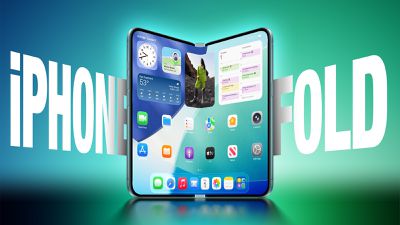
An iPhone with a larger display that also folds will require some major updates to iOSand iOS 27 will focus on building new interfaces and experiences made for a larger display.
The iPhone Fold will operate like a cross between an iPhone and an iPadbut it will run iOSnot iPadOSand it won't support iPad apps. When unfoldedthe iPhone will have an iPad-like layout that supports multitasking with two apps side-by-side. Many of Apple's iPhone apps will have sidebars on the left of the displaywith Apple providing developers with tools to easily adapt their apps to the new layout.
Apple is using a wider design for the iPhone Fold than most foldable smartphone makers have usedand it is rumored to have an iPad-like 4:3 aspect ratio. When the iPhone is closedit will have a standard iPhone layout that looks like the version of iOS we have now.
Smarter Siri
We were supposed to get the Apple Intelligence version of Siri in iOS 26.4but Apple is still having problems with development. Siri isn't yet operating as expectedand it's not ready to launch.

The new Siri features are being pushed to iOS 27and Apple is also planning for an entirely revamped chatbot version of Siri.
Apple is partnering with Google and plans to use a custom AI model built in collaboration with Google's Gemini team for some of the new Siri featuresincluding the Siri chatbot functionality that's coming.
Apple Intelligence Siri Features We're Waiting On
Apple described three specific ways that Siri will improve with Apple Intelligence integrationincluding personal contextthe ability to see what's on the screen to know what the user is talking aboutand the capability to do more in and between apps.
Siri will understand pronounsreferences to content on the screen and in appsand it will have a memory for follow-up requests.
Personal Context
With personal contextSiri will be able to keep track of emailsmessagesfilesphotosand morelearning more about you to help you complete tasks and keep track of what you've been sent.
- Show me the files Eric sent me last week.
- Find the email where Eric mentioned ice skating.
- Find the books that Eric recommended to me.
- Where's the recipe that Eric sent me?
- What's my passport number?
Onscreen Awareness
Onscreen awareness will let Siri see what's on your screen and complete actions involving whatever you're looking at. If someone texts you an addressyou can tell Siri to add it to their contact card. Or if you're looking at a photo and want to send it to someoneyou can ask Siri to do it for you.
Deeper App Integration
Deeper app integration means that Siri will be able to do more in and across appsperforming actions and completing tasks that are just not possible with the personal assistant right now. We don't have a full picture of what Siri will be capable ofbut Apple has provided a few examples of what to expect.
- Moving files from one app to another.
- Editing a photo and then sending it to someone.
- Get directions home and share the ETA with Eric.
- Send the email I drafted to Eric.
Answers and Images
Back in August 2025Apple software engineering chief Craig Federighi told employees that efforts to update the architecture were promising enough that Apple would be able to implement a "much bigger upgrade" than Apple originally envisioned.
Since thenrumors have suggested that Apple will add image generation capabilities to Sirirelying on Image Playground. Siri is also expected to get a "World Knowledge" search feature that would provide information on general search queries using information pulled from the web. Siri will be able to summarize web results like ChatGPT to answer questions.
Chatbot Siri
Apple is planning to turn Siri into a full chatbot that users can interact with similarly to Claude or ChatGPT. The Siri chatbot will be deeply integrated into Apple's operating systems at the system levelplus there will be a Siri app for back-and-forth conversations.
Siri will be able to do what current chatbots can dosuch as searching the web with visually rich resultsproviding summariesand evaluating uploaded documents. The personal assistant will still be integrated into Apple devicesand pressing the side button on an iPhone or using the Siri wake word will activate Siri. Siri integration will replace the current Spotlight search functionalitybut Apple plans to keep and expand on Siri Suggestions. Siri Suggestions will have more access to user data to provide more relevant prompts.
- Search the web for information
- Generate images
- Generate content
- Summarize information
- Analyze uploaded files
- Use personal data to complete tasks
- Ingest information from emailsmessagesfiles and more
- Analyze open windows and on-screen content to take action
- Control device features and settings
- Search for on-device contentreplacing Spotlight
Siri will also be integrated into Apple's core appsincluding MailMessagesApple TVXcodeand Photos. Siri will be able to search for specific imagesedit photoshelp with codingmake suggestions for TV shows and moviesand send emails. Pressing the side button on an iPhone or using the Siri wake word will activate Siri.
Dedicated Siri App
Apple is working on a dedicated Siri app to go along with the chatbot version of Siriputting the personal assistant on par with Claude and ChatGPT.
Siri will support both text and voice-based conversationsmuch like other chatbot apps. The app will display either a list or grid of past conversationswith options to favorite chatssearch through chatsinitiate new chatsand save chats. Conversations with Siri will resemble iMessage conversationswith Apple using chat bubbles. New conversations will start with suggested prompts on what to ask.
Siri Design Update
With Siri's transitionApple will be making multiple Siri-related design changes in iOS 27. Siri will largely live in the Dynamic Islandbut there will also be a dedicated Siri app for the first time.
When Siri is activated with the Siri wake word or through the iPhone's side buttona pill-shaped animation will be displayed in the Dynamic Island. When Siri is asked a question or given a taskthere will be a transparent results card. Swiping on it will bring up a conversation mode that looks similar to an iMessage chatand it will incorporate small cards for the weathernotesupcoming appointmentsand other information that's relevant to queries.
Apple's test interface includes a glowing Siri icon and a "searching" label in the Dynamic Island while Siri is processing a requestand once doneSiri expands into a larger translucent panel with the results. Pulling down on the menu initiates an interface for a conversation. Apple may also integrate an "Ask Siri" button into the menus of other appsgiving users a way to send content directly to Siri alongside a request.
Apple is also designing a full Siri app for Siri conversations. It will allow users to look back at prior chatsand begin new Siri chats. There is a grid of rectangles with summaries of past conversations that users can tap intoa search barand a "+" button for starting a new conversation. The app will support uploading images and documentsand users will be able to type to Siri or use voice input.
Swiping down from the top center of the display in any app will activate a system-wide search interfacewith a "Search or Ask" bar in the Dynamic Island for typing or speaking questions. Search or Ask is similar to Spotlight Searchbut Bloomberg suggests it will display "more advanced results and additional data from within apps."
Siri will be able to draw information from the web to provide detailed answers to the typical questions users ask chatbots. Siri's responses will include bullet points with information and large images.
While Siri is the default for the search barpressing on it will let users select other chatbots to speak withsuch as ChatGPT or Gemini. Apple plans to let users choose third-party AI services as the default for Apple Intelligence features like Writing Tools and Image Playgroundexpanding Apple Intelligence integration beyond ChatGPT.
Siri Extensions
Apple will let rival chatbots integrate with Siri in iOS 27expanding on the OpenAI partnership that currently allows Siri to hand off requests to ChatGPT. Apple plans to allow other chatbots like Claude and Gemini to work with Siriso users will be able to send questions to their favorite chatbot.
iPhone users will be able to select which services they want to use inside Siri through "Extensions" options coming to iOS 27iPadOS 27and macOS 27. The options will be available in the Apple Intelligence and Siri section of the Settings appwith Apple providing download links for chatbot apps.
Extensions will extend to Writing ToolsImage Playgroundand other Apple Intelligence featuresso users will be able to choose their preferred chatbot for Apple's built-in features. ChatGPT can be used for generating images or text in iOS 26but in iOS 27users will also be able to opt for other chatbots like Claude or Gemini.
Apple also plans to let users choose voices from third-party AI services for Siri,which would make it clearer whether Siri or another AI product like Gemini is responding. Siri would use one voicewhile responses from third-party AI options would use another voice.
Apple will add a dedicated Extensions section to the App Storewhich will be a sort of "marketplace" for third-party AI integrations.
Core AI Framework
Apple will introduce a Core AI framework for developers that replaces the current Core ML framework. The Core AI framework will provide developers with a way to integrate AI models into their apps.
Privacy
Apple plans to lean into privacy as a core tenant of its approach to AI. Users will be able to auto-delete chats after a set period of time. Time options include 30 daysone yearor forever.
Apple also plans to have limits around memoryincluding restrictions on the information that can persist and how long it is kept.
New AI Features
Image Playground
Apple plans to overhaul the Image Playground app. The interface for generating a new image has fewer controls and a "describe a change" option for editing images that are created. Previously created images are displayed in a grid with more rounded edgesand instead of a New Image buttonthere's a "+" button. Apple has also been testing new models that produce more lifelike imagesso we could see new image generation capabilities in iOS 27.
Genmoji
Apple is overhauling Genmoji to use less resources on the iPhoneso it won't cause the iPhone to overheat and drain battery. Apple also plans to add a Suggested Genmoji feature that will bring up custom emoji ideas based on media and text history.
Wallpaper Generator
iOS 27 will have a feature for creating custom wallpapers with AI. When choosing a new wallpaperusers will have the option to generate something custom using the Image Playground app. Image Playground is used for generating custom emoji and images that can be used throughout iOSand it is set to get an upgrade in iOS 27.
Apple is testing models that produce more lifelike imagesso the version of Image Playground that's used for generating custom wallpapers could be different from the current version.
Shortcuts
Shortcuts is also getting a major updatewith users able to use natural language to ask Siri to make a shortcut. There is an option for users to tell Siri what they want to accomplish with a shortcut to have the workflow created using AI.
The Shortcuts app has a prompt that says "What do you want your shortcut to do?" with a text field to enter a description. Shortcuts that are created using AI are then automatically installed and immediately available for use.
Writing Tools
Apple is testing an expanded version of Writing Tools that will do more rewriting and text generation than the current version. There is a "Write With Siri" toggle at the top of the keyboardalong with a "Help Me Write" option that comes up when Siri is activated while a text field is open.
Apple is planning to introduce a dedicated AI grammar checker for Writing Tools that will work like Grammarly. When writing in MessagesMailand other apps there will be a translucent menu that slides up from the bottom of the iPhone's screenand it will show suggested revisions next to the original written text.
Users can go through the suggestions and accept or reject them one by oneapprove all of the changes at onceor ignore all of the changes. Apple has an option for pausing grammar checking and for moving between different flagged sections of text. Apple already has a spellchecking featurebut the new feature will add grammar suggestions.
Photos App
The Photos app in iOS 27iPadOS 27and macOS 27 will have an Apple Intelligence Tools section when editing an image. Options will include ExtendEnhanceand Reframe.
- Extend - Extend generates additional image content beyond the original frame of the photofilling in scenery when changing the crop of an image. This tool will support expanding the edges of an image with zoom gestures.
- Enhance - Uses AI to automatically tweak colorlightingand other image parameterssimilar to how the auto editing feature works now.
- Reframe - When used with spatial photosReframe will let users change the perspective of an image after it's captured.
Apple apparently hasn't gotten the tools working perfectlyso Extend and Reframe could be delayed or scaled back.
AI Calendar App
iOS 27 could include a Calendar app that incorporates AI.
AI Health Features
Apple planned a full AI-powered Health+ subscription servicebut plans have been scaled back. Some components that Apple planned to implement could still be introduced in iOS 27though it's unclear what we'll get.
Health+ reportedly would have provided health recommendations in the Health appdelivering detailed health reportsvideos that explain medical conditionsand wellness tips.
System-Wide Design Changes
There are system-wide design changes coming in iOS 27. The tab bar in apps like Apple MusicPodcastsNewsand Apple TV will be adjusted to combine search with the other navigation options. Apple separated search in many apps when introducing Liquid Glassbut it sounds like the company is going to revert to the prior unified design.
When using the on-screen keyboardthere's a new animation that shows the keys sliding up from the bottom of the iPhone interfaceplus Apple is adding redo and undo controls for fixing actions when customizing the Home Screen's icon and widget layouts.
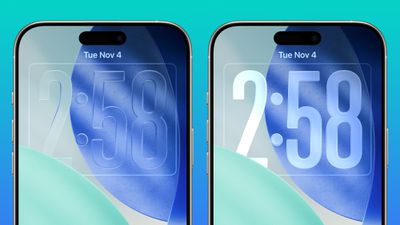
Apple doesn't plan to make major changes to the Liquid Glass aesthetic in iOS 27but the company is mulling a system-wide setting that would precisely adjust the look of the interface. In iOS 26.2Apple added a slider that lets users adjust the opacity of Liquid Glass for the Lock Screen's clockand that setting could be expanded to the entire operating system.
Other Features
Custom Wallet Passes
iOS 27 will include a "Create a Pass" feature that lets users generate digital passes from scans of things like movie ticketsconcert passesand gym membership cards.
Create a Pass will bridge the gap between the Wallet app and passes that are not compatible with it. Users will be able to tap on the "+" button in the Wallet app and then scan a QR code on a pass or ticket if one is available. If there is no QR code availablethere will be an option to create a custom pass.
There are three pass types in Create a Passeach with a different color. Apple is using purple for eventsblue for membershipsand orange for other types of passes. Users will be able to customize imagescolors and and text on the digital passes.
Camera App
Apple plans to make the Camera app more customizable in iOS 27. Users will be able to select the features they want to see in the Camera applike flashexposuretimerdepth of fieldphoto sand resolution.
Camera controlslabeled as widgetswill be able to be placed at the top of the Camera interface in any order. Users will be able to select widgets from a transparent widget tray that comes up from the bottom of the app. Widgets will be organized into categories that include basicmanualand settings.
Apple plans to use the same default layout that's available now with quick tap buttons for flashLive Photosand Night Modebut the customizable interface will be added as a new advanced layout that will appeal to professional users. Right nowusers can tap into a view with all of the Camera controls from the top right of the appbut that view is moving to the right of the shutter button. Apple will also add new grid and level options.
The Camera app in iOS 27 will also have a dedicated Siri mode that will be available alongside the existing PhotoVideoPortraitand Panorama modes. When in Siri modethe existing Camera app shutter button will feature the Apple Intelligence logoletting users know the Siri features are available.
Siri mode will incorporate Visual Intelligencemaking it more accessibleand there are new Visual Intelligence coming as well. It will be able to scan a nutrition label on food items to log the dietary informationplus users will be able to use it to add contact details for someone directly to the Contacts app.
- Nutrition - Users will be able to scan nutrition labels on food packaging for calorie and macronutrient tracking using the Health app.
- Contacts - Visual Intelligence will let users scan phone numbers and addresses on business cards and other print mediaadding the information to the Contacts app.
- Wallet - In the Wallet appVisual Intelligence will capture information from physical event tickets and membership cardsgenerating digital versions.
Weather App
In the Weather appthere will be a new Conditions panel for switching between temperaturerainand wind. It will be the same as the interface that's available when tapping into one of the weather modules in the current version of the app.
Safari
Apple plans to add an updated start page to Safariand it will have four tabs across the top for swapping between favoritesbookmarksReading Listand history.
New Satellite Features
Apple is working on several new satellite features for the iPhoneand it's possible some features could be introduced as soon as 2027. Timing on Apple's satellite improvements is unclearthoughand behind-the-scenes updates from Apple's satellite partner Globalstar are required. Rumored features:
- Apple Maps via satellite
- Photos in Messages via satellite
- Satellite API framework for third-party apps
- Satellite over 5G
- Satellite connectivity without the need for a view of the sky
Some of these features might require new hardwarebut options like Apple Maps via satellite would not require components beyond what's available now.
Performance and Stability
Bloomberg's Mark Gurman has described iOS 27 as a "Snow Leopard" updatesuggesting that Apple will focus on improving underlying performance and quality.
Apple is prioritizing cleaning up the iOS code and removing anything that's outdatedwhich could mean upgrading apps to improve performance and rewriting some existing features to be more efficient. The code updates could provide a more responsivefaster version of iOS.
Apple is also aiming for efficiency improvements that could translate into tangible battery life gains.
Compatibility
iOS 27 could drop support for the iPhone 11iPhone 11 ProiPhone 11 Pro Maxand second-generation iPhone SE. Rumors suggest that it will be compatible with the following devices:
- iPhone 17
- iPhone 17 Pro
- iPhone 17 Pro Max
- iPhone Air
- iPhone 16e
- iPhone 16
- iPhone 16 Plus
- iPhone 16 Pro
- iPhone 16 Pro Max
- iPhone 15
- iPhone 15 Plus
- iPhone 15 Pro
- iPhone 15 Pro Max
- iPhone 14
- iPhone 14 Plus
- iPhone 14 Pro
- iPhone 14 Pro Max
- iPhone 13
- iPhone 13 mini
- iPhone 13 Pro
- iPhone 13 Pro Max
- iPhone 12
- iPhone 12 mini
- iPhone 12 Pro
- iPhone 12 Pro Max
- iPhone SE (3rd generation)
Launch Date
New versions of iOSmacOSand Apple's other software platforms will be previewed in June at WWDC before launching in September just ahead of when new iPhone models come out. The WWDC keynote will be held on MondayJune 8.
