Smart Tools
These tools use artificial intelligence and can save you a lot of time.
 Spot Healing Brush
 Spot Healing Brush
Spot Healing brush lets you remove objects and unwanted artifacts from pictures. Simply draw over an unwanted areajust like you do with a Brush tooland release the mouse. After thatthe areathat you drew overwill be "forgotten" and replaced with some appropriate contentthat surrounds the area.
For examplewhen you have a sandy beach and there is a stone in the middle you draw over that stone and it will be replaced with sand. If you have a field with yellow flowers and a single red floweryou draw over the red flower and it will be replaced by a yellow flower. You can "heal" the skinremove scratches from old photographs etc.
You would have to use Clone Stamp for several minutes to achieve a similar result. Spot Healing Brush usually takes 1 to 5 seconds. In extreme casesit may take up to 10 seconds to fill the area (when the areamore than 50% of the image area should be healed).
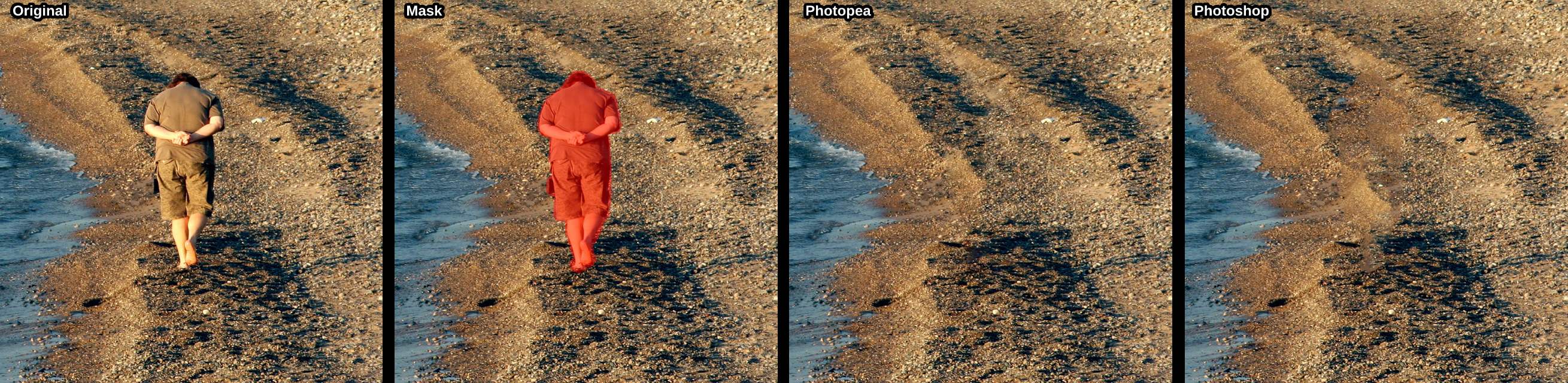
Belowyou can see the original imagethe spotthat is being healed the result from Photopea and the result from Adobe Photoshop. We believethat Photopea produces better resultsthan Adobe Photoshop (but it also takes more time).


 Healing Brush
 Healing Brush
Using a Healing brush is the same as using Clone Stamp. The only difference isthat the cloned content is adapted to the surrounding after releasing the mouse.
 Patch
Patch
 Patch
PatchWith a patch toolyou first have to create a selection over an area that you want to be replaced. Thenyou can drag that selection to another placeto choose the source of cloning. And againthe area is adapted after releasing the mouse.
With the Spot Healing Brushyou only choose an area that should be healed. For next two toolsyou have to choose both that area and the sourcefrom which the new image content should be taken (similar to a Clone Stamp).