
August 20 2024
Web Version Document Handling and Extended Functionality.
I can’t seem to open documents from the Web Version of Case Manager?
Handling documents from the Web Version of Case Manager can slightly differ from the Desktop Version. Thereforeit is important to review the following points to troubleshoot any issues you may be experiencing:
- From the User Options menucheck and see if you are using the Document Manager option:
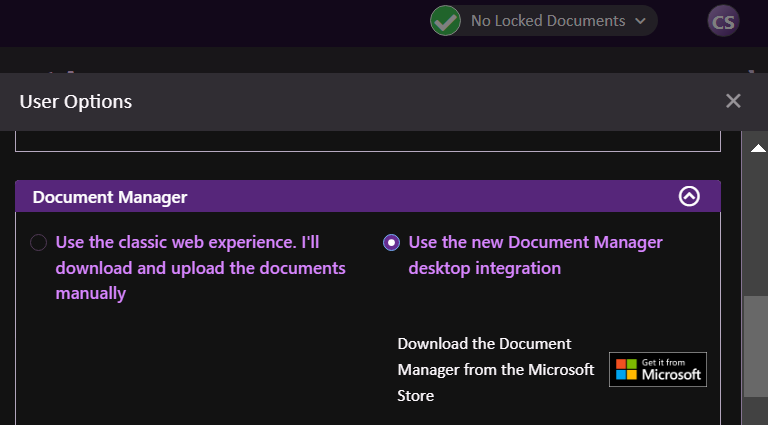
- Check the default program used to open documents from the Web Version Case Manager.
Windows occasionally changes this to a different application which prevents documents from opening correctly:
- From the Windows Start Menusearch forand open ‘Default apps’.
- Search for ‘Document Manager’ in the app list and then select the Case Manager Document Manager.
- Select the Document Manager application again and choose to ‘Set default’.
- Log out of Case Managerrestart Chromeand attempt to open documents again from Case Manager.
- If the issue persistsplease try re-installing the Document Manager:
- From the Windows Start Menusearch for ‘Programs’ and select ‘Add or remove programs’
- Search for ‘Document Manager’click the three dots on the rightthen click uninstall.
- Restart your machine.
- From the Windows Start Menusearch for ‘Microsoft Store’ and click to open.
- Search for ‘Case Manager Document Manager’ and then click ‘Get’.
- Log into Case Manager.
- Your documents should then open as expected.
If none of the solutions presented above seem to workplease reach out to our Support Team via ‘[email protected]’ and one of our friendly staff will be happy to help.
If I accidentally delete or remove text from a plain text documentcan this be recovered?
If a plain text document has been incorrectly updated and still exists in the documentation taba Case Manager System Administrator may be able to revert the document using the Audit History feature:
https://learning.casemanager.biz/web/SecurityAndMaintenance/AuditHistory.htm
With thisthe old value of the document may be visible and can be copied to replace the incorrect value.
Please noteCase Manager stores plain text documents directly in the databaseand does not store them in an external location. This means that when these types of documents are deletedthey are effectively removed from the database. This can make them difficult to recover.
If you need assistance with recovering a plain text document that has been fully deleted from the databaseour Professional Services Team can use their expertise to recover a copy from a backup of your database.
Please reach out to our team via ‘[email protected]’ if at any time you wish to request this service.